
Quickly export and analyse large amounts of RTI data (using AI) with PackControl
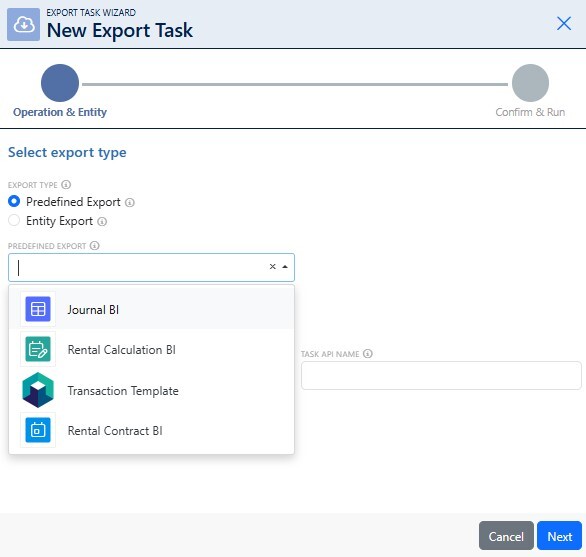
The PackControl Data Export Module is AI-ready. It allows you to quickly export large volumes of data for analysis or further processing. Structured data and built-in AI prompts make it easy to generate analyses, pivot tables and charts and gain valuable insights. This transforms your packaging registration into true packaging management. In this article, we’ll tell you more about it.
The packaging management module in PackControl contains all your reusable packaging-related information, clearly organised in a single system. From this, you can extract valuable insights that will help you manage costs and ensure the optimal use of items, especially if you export the data for use in e.g. Excel or your Business Intelligence (BI) software.
Other systems quickly reach their limits: large exports overload servers, BI software and Excel cannot interpret your data, and creating pivot tables and charts is time-consuming. At PackControl, we have developed a solution that overcomes all these obstacles: the Data Export Module.
It has always been possible to export data from PackControl, and our new Export Task Wizard makes this process even easier and more comprehensive. This module was developed in consultation with our software users, who told us exactly which analyses they wanted to perform and which problems they frequently encountered. Thanks to this close collaboration, the module is now more comprehensive and user-friendly than ever.
The Export Task Wizard in the module helps you export large amounts of data quickly and easily, without overloading servers. In three minutes, you can export up to 1,048,576 rows from PackControl. You cannot export more, as this is Excel’s row limit. For exports you can choose from a wide range of file types, such as XLSX, XLSM, CSV, JSON and XML.
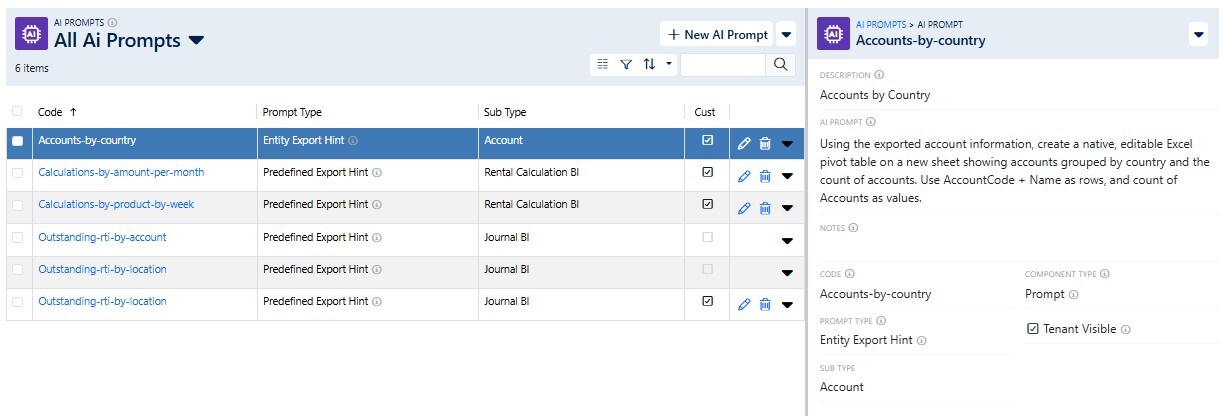
The PackControl Data Export Module is AI-ready. Data is labelled and structured in such a way that it can be easily analysed using AI. This means that tags added to customers and ticked boxes, for example, can be understood by BI software and AI, just like the description of each column. Each row therefore stands on its own, and you can analyse each of the 90–95 columns.
While you previously had to analyse data in Excel yourself, we have now created AI prompts in PackControl for the most frequently requested analyses. These can be exported alongside the data. With e.g. the Claude by Anthropic Excel add-in, you can easily analyse data, create pivot tables and charts, and quickly prepare professional management reports. Of course, you can also write your own prompts for other analyses. The possibilities for customised reports are endless.
You can export over a million rows in under three minutes, without causing server overload, for your own analysis or for use with AI.
Efficient packaging management is more than just recording transactions and counting items. The better you track what happens to your reusable packaging, the more valuable insights you can extract from the collected data. This helps with more efficient planning and cost control.
Would you like to know more about our AI-ready Data Export Module? We’d be happy to show you how it works in a no-obligation demo.